Scaffolder
Spotify
Summary
Even though there was a demand for standardizing engineering best practices, only a few customers of Spotify Portal actually adopted the plugin built for it. To improve adoption, I designed 2 different solutions for 2 adoption blockers, turning a code-only workflow into a low-code experience.
Shipped to immediate impact: cut time-to-first-completion from 4–5 weeks to 2 weeks, and lifted adoption from 13% to ~30% of all customers.
Role: Product Design, User Research
Type: Product / UX Improvement
Background
Spotify's Developer Portal is the commercial, SaaS version of Backstage, Spotify's internal developer platform. In Beta, it had a Time-To-Value problem: onboarding a single plugin took 4–5 weeks, and beta customers who couldn't see returns quickly weren't converting to paid.

Improving a high-value plugin became a priority. Scaffolder – a plugin to turn team standards into reusable templates – looked like the obvious candidate. It had saved 10,000+ hours inside Spotify, and market research ranked templating as one of the capabilities Portal's customers valued most.
However, only 13% of all customers used it. Even though the demand was real, something was blocking adoption.
Discovery
I pulled customer support tickets and interviewed Spotify’s deployment engineers to find out who wasn't adopting Scaffolder, and why. The adopters are high-maturity, well-invested engineering organizations, while non-adopters split into two groups:
Two reasons for not adopting
Low-Maturity Teams
Teams who were just ramping up dev-ops don’t any best practices or standards to templatize yet.
Under-Resourced Teams
For more mature yet under resourced teams, the plugin has too high of a learning curve.
Esoteric code structure
Auditing the end-to-end flow revealed a specific point of friction. Software templates have a unique code structure that users would need to learn, but the code authoring UI didn’t provide enough guidance.
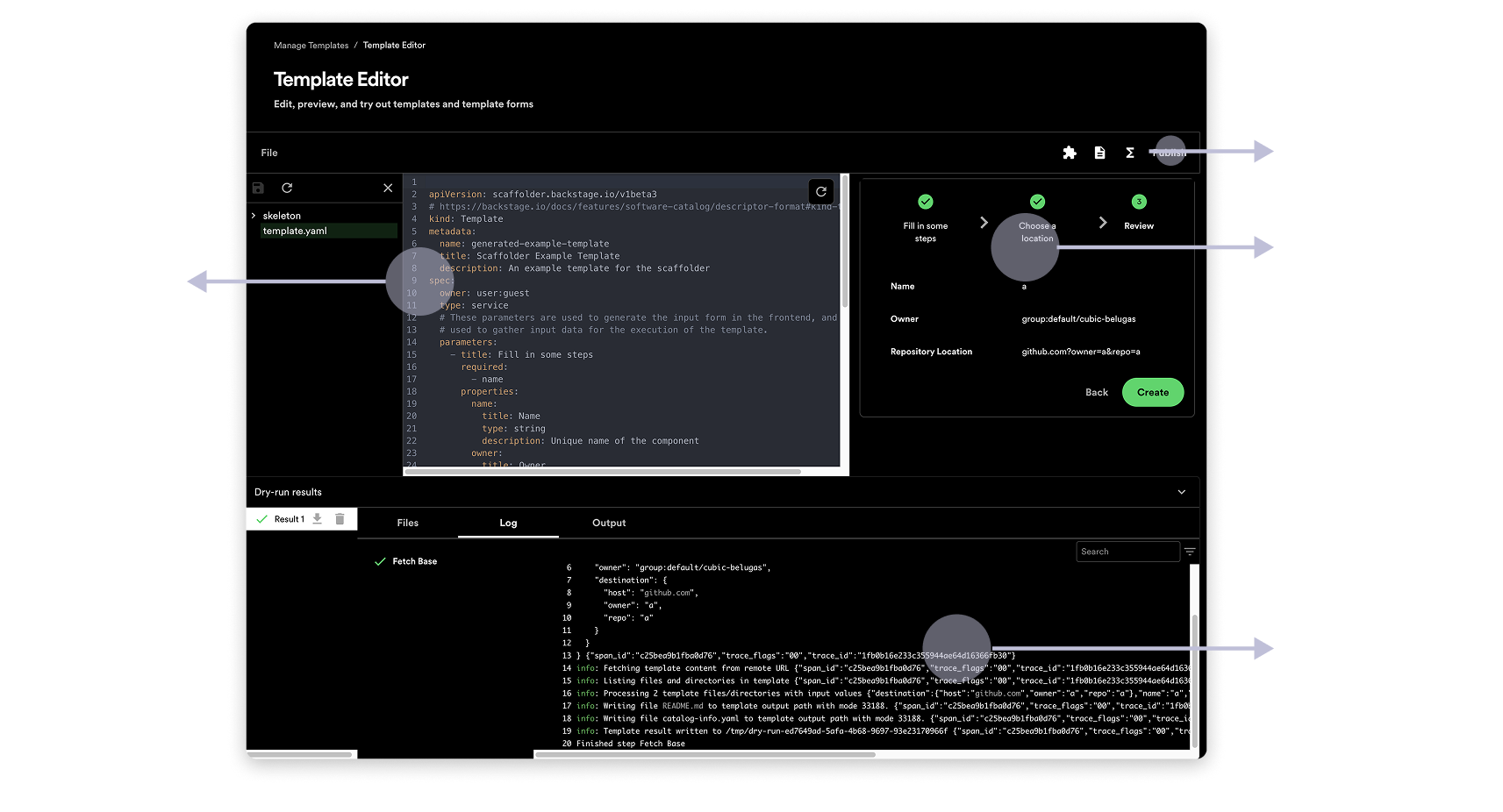
The overly busy UI did not facilitate learning the esoteric structure of Software Templates.
Using AI to move fast & accurately
Prototyping text-based experience
It was important to test different solutions with an actual text-based, code editing experience. I used Figma Make to quickly generate interactive prototypes in 2 days.
Closing design gaps in QA
In QA stage, I used Cursor to fix any inconsistencies in typography, paddings, icon and other styling elements.
Design Decisions
The two non-adopter profiles had different blockers, so we shipped two experiments rather than betting on one solution.
Experiment 1: Pre-made templates for low-maturity teams
A team that hasn't standardized its practices can't templatize them, so the fastest path to a working template was to not make them write one at all.
My PM and I worked with our deployment engineers to create Spotify-endorsed templates that work out-of-the-box (e.g. a React app, API gateway). Users can then pick one to edit toward their own standards.
Experiment 2: Low-code for under-resourced teams
Making template structure legible
The old editor handed users a single YAML file and assumed they'd read the docs to understand its structure. So before touching the editing experience, I visually split the YAML into its three parts: Form, Actions, and Output, each with explanation available on demand.
The code editing surface is now split into 3 different sections
Low-code, not no-code
I wanted to reduce the effort needed from users to learn and write template codes. What if we make it easy for users to add the right code?
I prototyped two alternative coding “paradigms” and tested both with 10 non-Portal users and 2 existing Scaffolder users.
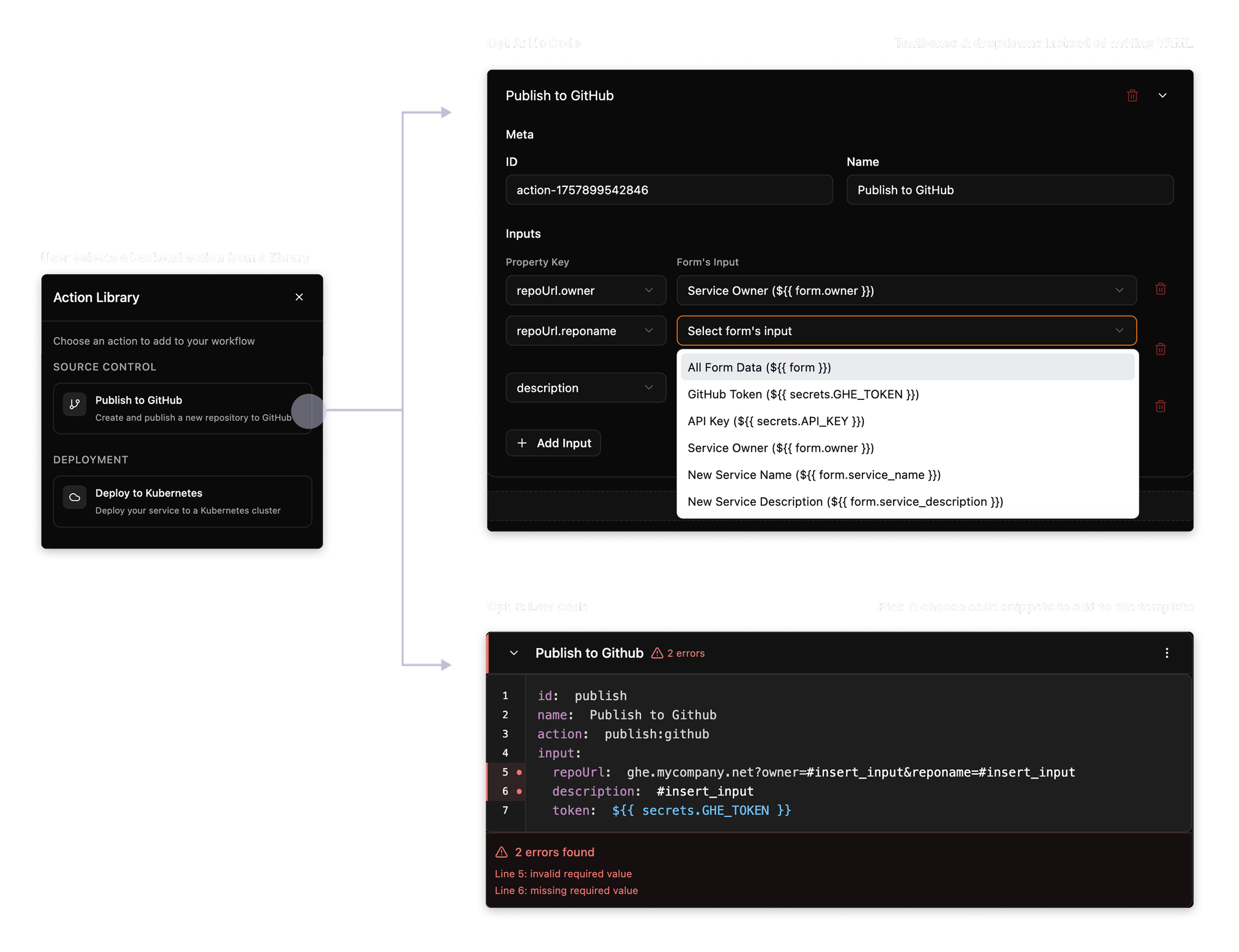
The No-Code concept had 100% task completion rate and was preferred by 83% of testers. On the other hand, the Code-Block concept had 83% completion, and the failures were on code syntax.
Even though the No-Code concept won in usability, it would require significant engineering investment that the team didn’t have time for. So I moved ahead with the Code-Block concept with the autocomplete and inline-validation to catch syntax errors.
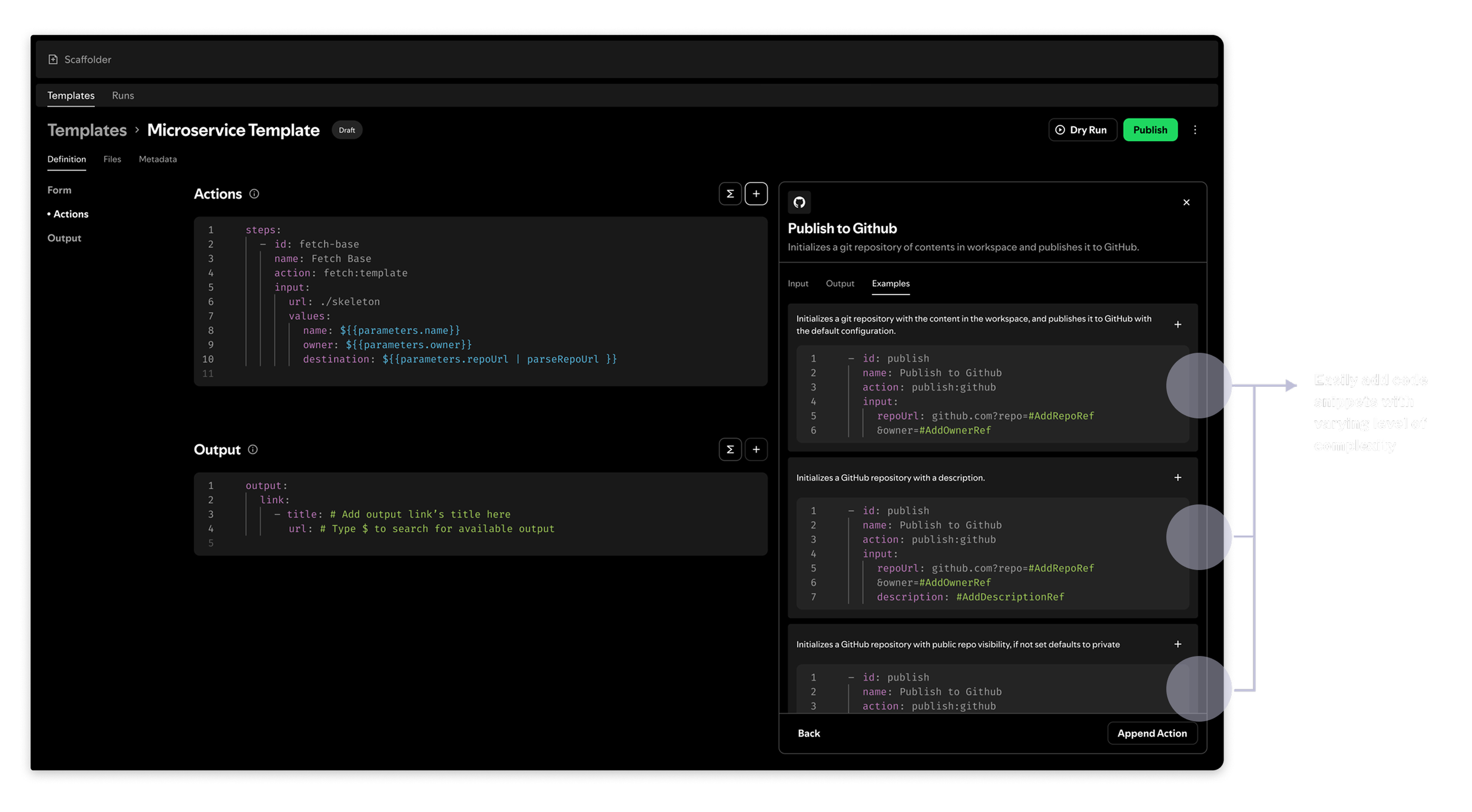
Final design: make the right code easy to add. A side drawer holds a library of ready-made code blocks at varying complexity.
Users insert a working example and adjust it, rather than composing from scratch.
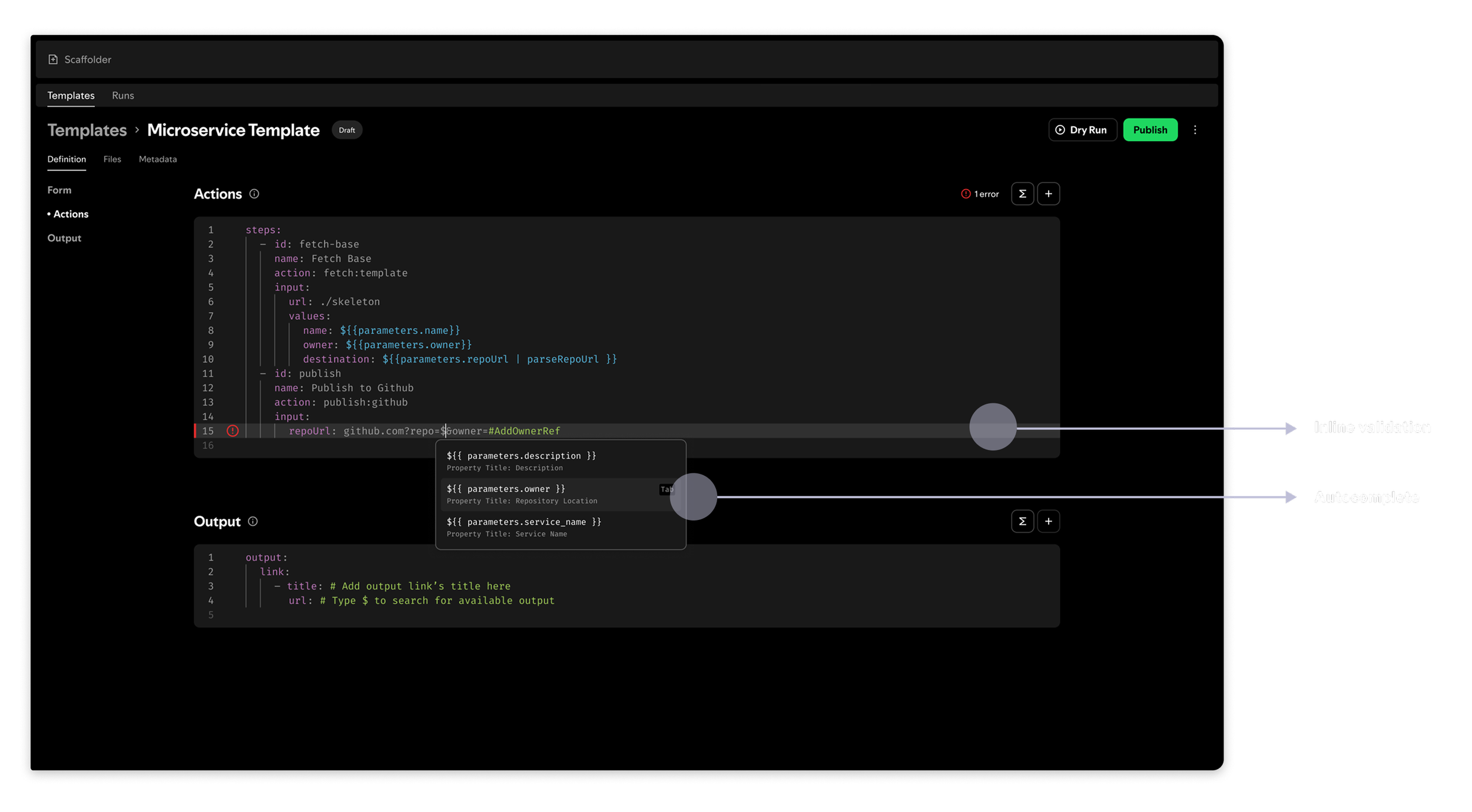
Final design: make the wrong code hard to write.
Autocomplete for keys and values, plus inline validation that catches errors as they're typed instead of at dry-run.
Publishing without leaving the platform
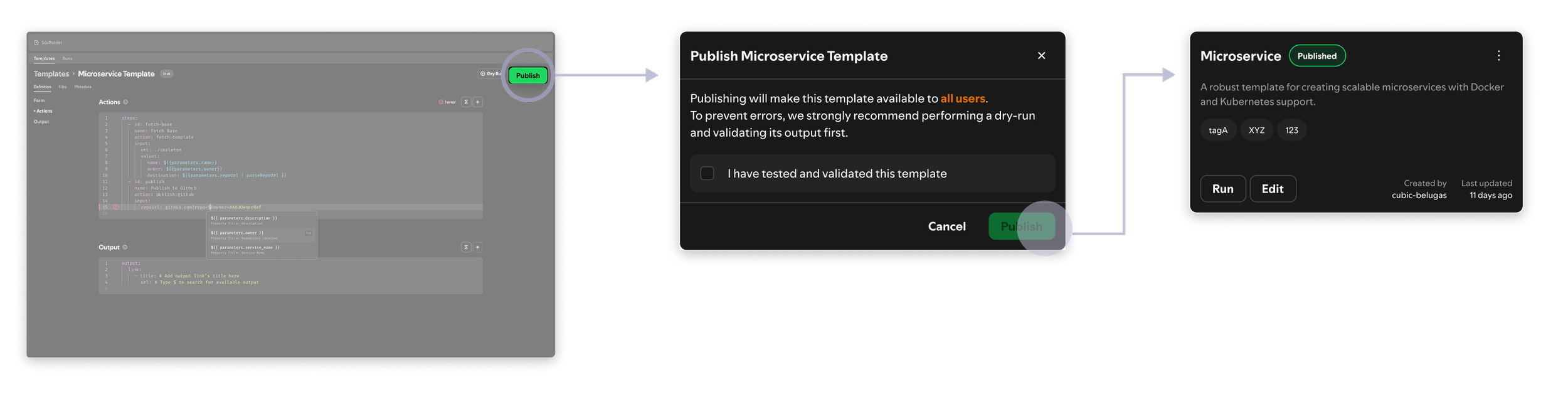
Publishing a finished template used to mean 2 separate steps: (1) pushing and merging on GitHub, then (2) registering the template back to Portal. The new design merged these steps so users can cross the finish line, all within Portal.
Impact
4-5 weeks → 2 weeks
for a new customer to publish their first Scaffolder template
13% → 30%
of all customers now use a Scaffolder template
Which experiment worked?
Both onboarding and adoption gains came mostly from low-maturity customers, and pre-made templates did the heavy lifting. Low-code, on the other hand, was not enough for creating or translating complex ones, which was where the more mature customers were.
Looking at the wider development trend and the rise of coding agents, the next steps would be to add an automated translation layer, instead of code authoring piece-by-piece, as well as turning Scaffolder into MCP for coding agents.
More Case Studies

Canon Design System
Spotify

Data Pipeline Creation
ActionIQ

Spotify Data Experience Plugin
Spotify
DevEx Metrics Dashboard
Spotify